If you are facing a time where you attempt to log into our Webmail software, but then immediately get put back to the login screen (similarly you might see 401 Unauthorised on the network log) , then there are a few reasons why this might occur:
- Your account has been locked due to being out of credit.
Due to the way that the system works in the backend, accounts that have run out of credit will have their access to view emails restricted until more credit is added to the account. To add more credit, you can do the following:
- Log into the admin account
- Head to the billing tab
- Enter an amount of credit to add to your account
- Pay for credit
1. Log into the admin account
Head to the account login page (not webmail). If you have any issues with this, or have forgotten what the admin account is, you can contact us at support@purelymail.com or create a ticket above.
2. Navigate to the billing tab
Once you are logged in, you can head to the billing tab at the top of the screen. This will provide you with all of the options required for any billing and payment details for the account.
3. Enter an amount of credit to add to the account
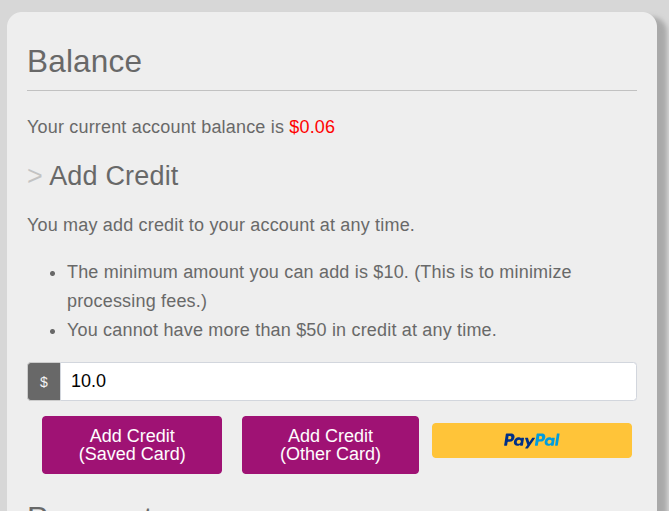 Using the menu shown above, you can choose an amount of credit that you want to add to your account, and then either choose a saved card or add a new card to pay with. Additionally PayPal is available.
4. Pay for credit
You will then be redirected to the payment provider to complete the transaction. After confirmation, this credit will be added to your account, which will re enable access to Webmail, and to sending and viewing on mobile clients.
Was this article helpful?
That’s Great!
Thank you for your feedback
Sorry! We couldn't be helpful
Thank you for your feedback
Feedback sent
We appreciate your effort and will try to fix the article