Troubleshooting: "The Verification Request Has Failed" in Webmail
If you encounter a security warning while using Roundcube Webmail, don't worry—it’s a common occurrence designed to keep your account secure. Here is a quick guide to understanding and resolving the issue.
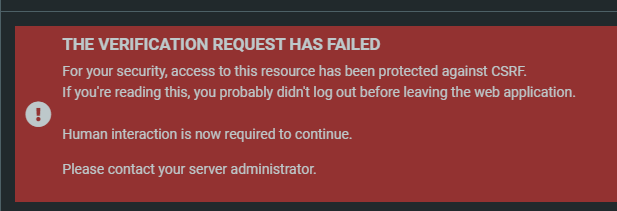
Why am I seeing this?
The error indicates that your authorization token has expired. This happens when a single session remains active for an extended period.
Essentially, the system has logged you out for your own security because the session has been open for too long. While the message suggests contacting an administrator, you can usually fix this yourself in under a minute.
How to Fix the Error
To refresh your session and clear the restriction, follow these three steps:
Log out: Click the red logout button located at the bottom left of the Webmail interface.
Navigate back: Go to purelymail.com and click the Webmail link at the top right.
Sign in: Log back into your account.
This generates a fresh authorization token, allowing you to resume your work without interruption.
How to Prevent This in the Future
Log Out Regularly: The most effective way to avoid this is to log out whenever you are finished checking your email.
Manual Refresh: If you need to keep your email open all day, try logging out and back in every 3 hours or so to manually refresh the token.
Still Seeing the Error?
If the message persists after logging back in, try these additional troubleshooting steps:
Clear Cache & Cookies: Remove your browser's local site data to ensure the old, expired token is completely deleted from your device.
Use Incognito Mode: Open an Incognito or Private window. This provides a fresh environment without any interference from previously stored data.
Was this article helpful?
That’s Great!
Thank you for your feedback
Sorry! We couldn't be helpful
Thank you for your feedback
Feedback sent
We appreciate your effort and will try to fix the article